
Sentry collects unhandled exceptions from your Django app, groups them into issues, adds context (user, request, release, breadcrumbs) and alerts the team. This lesson connects sentry-sdk and tunes it for production.
What Sentry adds to logs
A log line says that something failed. Sentry gives you one issue per distinct error, how many users it hit, which release introduced it, the traceback with local variables and a notification in email or Slack. Use both: logs for the story, Sentry for the alarm (see Django logging).
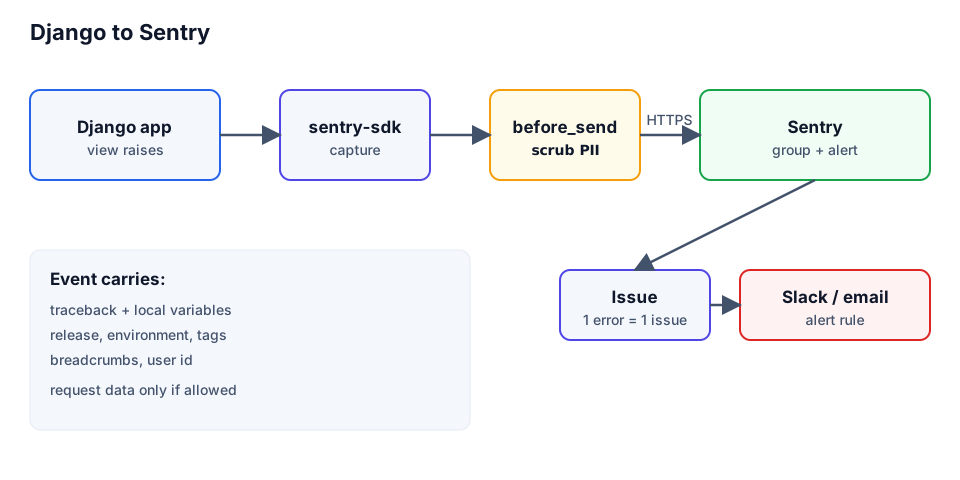
Installation and init
pip install "sentry-sdk[django]"Create a project in Sentry, copy its DSN and call init early in settings.py. The Django integration is enabled automatically when Django is installed; passing it explicitly lets you set options such as transaction_style.
# settings.py
import os

import sentry_sdk
from sentry_sdk.integrations.django import DjangoIntegration

sentry_sdk.init(
    dsn=os.environ.get('SENTRY_DSN'),          # None -> SDK stays off
    environment=os.environ.get('SENTRY_ENVIRONMENT', 'development'),
    release=os.environ.get('GIT_SHA'),
    integrations=[DjangoIntegration(transaction_style='url')],
    traces_sample_rate=0.1,
    send_default_pii=False,
)
If SENTRY_DSN is missing, the SDK stays disabled, so local development sends nothing. The SDK also reads SENTRY_DSN, SENTRY_ENVIRONMENT and SENTRY_RELEASE from the environment itself.
