
Why htmx
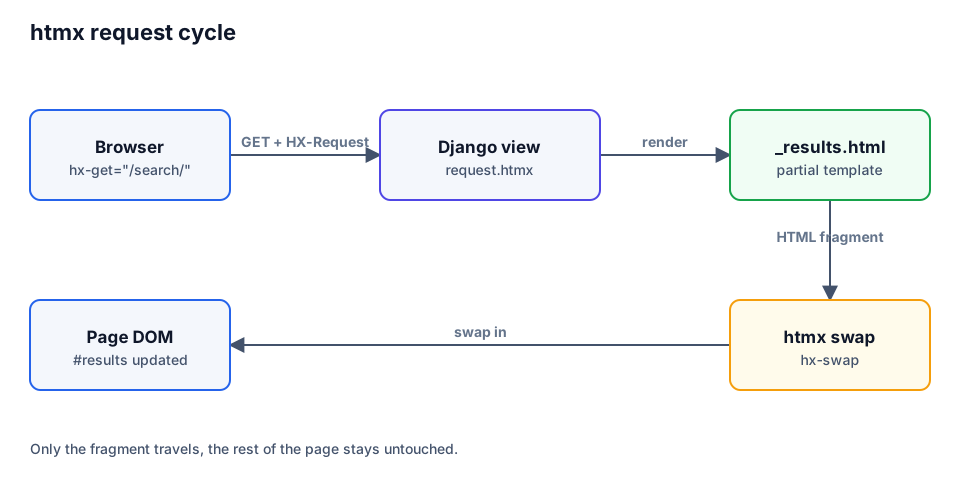
Many pages only need a small live part: a search box, a "load more" button, an inline form. htmx covers that with HTML attributes: an element sends a request, the server returns an HTML fragment, htmx swaps it into the page. You keep Django views and templates, and there is no build step or JSON layer.
| Approach | Server returns | Client code |
|---|---|---|
| Classic | full page | none |
| htmx | HTML fragment | one script, hx-* attributes |
| SPA | JSON | framework, state, build step |
💡 Build the plain full-page version first. htmx then only improves it, and the site still works without JavaScript.
Setup
Install pip install django-htmx. The package adds request.htmx and helpers; the htmx library itself is loaded with a <script> tag.
# settings.py
INSTALLED_APPS = [
    # ...
    "django_htmx",
]

MIDDLEWARE = [
    # ...
    "django_htmx.middleware.HtmxMiddleware",
]{% load django_htmx %}
<!doctype html>
<html lang="en">
<head>
<script src="https://unpkg.com/htmx.org@2.0.4"></script>
{% django_htmx_script %}
</head>
<body hx-headers='{"X-CSRFToken": "{{ csrf_token }}"}'>
{% block content %}{% endblock %}
</body>
</html>hx-headers on <body> puts the CSRF token into every request. {% django_htmx_script %} shows error responses in the browser while DEBUG is on.
⚠️
django-htmxdoes not ship the htmx library. Add the script from a CDN or your static files.
Partial templates and search
Split a template into a full page and a fragment. The view returns the fragment when request.htmx is true.
# blog/views.py
from django.shortcuts import render

from .models import Post