
Picture a profile screen in a mobile app: the user's name, their two latest posts and the number of followers. A simple task — but if the API is built on REST, the app has to send three requests to three different addresses, and each response returns more fields than the screen needs. In this lesson we will look at the problem GraphQL solves, how it works, and when you should (and should not) choose it.
The problem: one screen, many requests
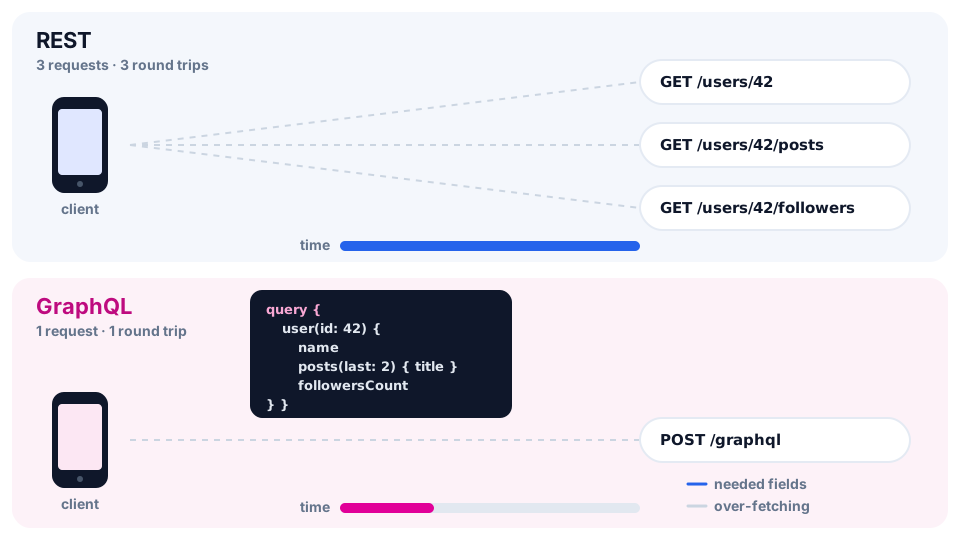
In REST every resource lives at its own address. To build the profile screen, the client does this:
GET /users/42             → id, name, email, avatar, createdAt, settings…
GET /users/42/posts       → every post in full: text, tags, dates…
GET /users/42/followers   → the full list of followers
There are two problems at once:
- Under-fetching — one request is not enough, so the client has to make several. On a mobile connection every extra round trip to the server costs hundreds of milliseconds.
- Over-fetching — the server returns everything it knows about a resource, while the screen needs 2–3 fields. The extra kilobytes cost data and battery.
These problems are usually "fixed" with special endpoints such as /users/42/profile-screen. But the number of screens grows, the web and mobile apps need different things — and the backend turns into a zoo of almost identical routes.
What GraphQL is
GraphQL is a query language for APIs and a runtime that executes those queries on the server. It was created at Facebook in 2012 for mobile apps, open-sourced in 2015, and today the language is developed by the independent GraphQL Foundation.
The key idea: the client describes the shape of the data it needs, and the server returns exactly that — nothing more, nothing less. All requests go to a single address (endpoint), usually /graphql.
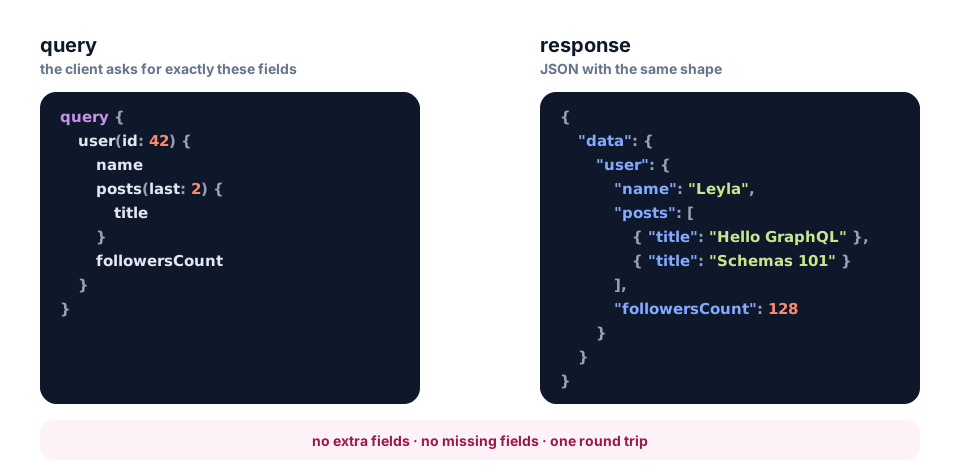
The same profile screen — with one request:
query ProfileScreen {
  user(id: 42) {
    name
    posts(last: 2) {
      title
    }
    followersCount
  }
}
And the server's response:
{
  "data": {
    "user": {
      "name": "Leyla",
      "posts": [
        { "title": "Hello GraphQL" },
        { "title": "Schemas 101" }
      ],
      "followersCount": 128
    }
  }
}
Notice that the response mirrors the shape of the query. You asked for name — you got name. You did not ask for email — it is not in the response. The root of the response is always the data object.
💡 GraphQL is not a database and not a library for a particular language — it is a specification. GraphQL servers are written in JavaScript, Python, Go, Java, PHP and other languages, and the data can live anywhere: in PostgreSQL, MongoDB, another REST API or a cache.
Three kinds of operations
| Operation | Used for | Similar in REST to |
|---|---|---|
query | reading data | GET |
mutation | creating, updating, deleting | POST, PUT, PATCH, DELETE |
subscription | real-time events | WebSocket or SSE |
We will cover queries (query) in detail in the next lessons; mutations and subscriptions have their own topics too.
The schema — a contract between frontend and backend
A GraphQL server always describes its data with a schema — a set of types and fields. The schema is written in SDL (Schema Definition Language):
type User {
  id: ID!
  name: String!
  posts(last: Int): [Post!]!
  followersCount: Int!
}

type Post {
  id: ID!
  title: String!
}

type Query {
  user(id: ID!): User
}
The schema gives you three important benefits:
- Strong typing. The server knows in advance which fields exist and what type they are. A query with a non-existent field is rejected before it runs.
- Self-documentation. You can ask the server for its own schema (this is called introspection), which is why tools like Apollo Sandbox show documentation and autocomplete.
- A contract. Frontend and backend agree on the schema and then work in parallel: the frontend can write queries while the backend is still implementing them.
The ! sign means "this field is never null". We will cover all the types in the next lesson.
How the server executes a query
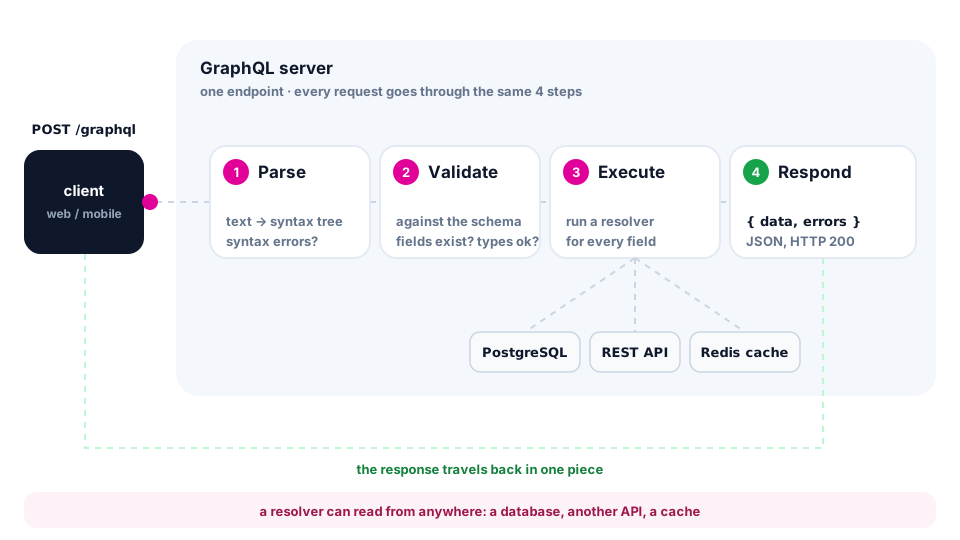
Every request to a GraphQL server goes through the same four steps:
- Parse — the query text is turned into a syntax tree. A missing brace fails right here.
- Validate — the query is checked against the schema: do the fields exist, are the argument types correct.
- Execute — for every requested field the server calls a resolver function that fetches the data: from a database, another API or a cache.
- Respond — the results are assembled into JSON with the same shape as the query:
{ "data": …, "errors": … }.
Technically, a GraphQL request is a regular HTTP POST with a JSON body. You can even send it from the terminal:
curl -X POST http://localhost:4000/graphql \
  -H "Content-Type: application/json" \
  -d '{"query":"{ user(id: 42) { name followersCount } }"}'
Errors and HTTP status codes
In REST the response status tells you about an error: 404, 400, 500. In GraphQL the server usually answers 200 OK and puts errors into the errors array — next to whatever data it managed to fetch:
{
  "data": { "user": null },
  "errors": [
    {
      "message": "User 42 not found",
      "path": ["user"],
      "extensions": { "code": "NOT_FOUND" }
    }
  ]
}
The path field shows which field of the query failed, and extensions.code is a machine-readable code the client uses to decide what to do.
⚠️ A common beginner mistake is checking only
response.ok. In GraphQL a response can arrive with status 200 and still contain errors. Always check theerrorsfield.
Sending a query from JavaScript
You do not need a special library to start — plain fetch is enough:
const query = `
  query ProfileScreen($id: ID!) {
    user(id: $id) {
      name
      followersCount
    }
  }
`;

const res = await fetch('http://localhost:4000/graphql', {
  method: 'POST',
  headers: { 'Content-Type': 'application/json' },
  body: JSON.stringify({ query, variables: { id: '42' } }),
});

const { data, errors } = await res.json();
if (errors) console.error(errors);
else console.log(data.user.name); // Leyla
Values are passed separately in variables instead of being glued into the query text — it is safer and more convenient. We will cover variables in detail in the lesson about queries.
REST or GraphQL: a comparison
| Criterion | REST | GraphQL |
|---|---|---|
| Addresses | many endpoints (/users, /posts) | one endpoint (/graphql) |
| Shape of the data | decided by the server | decided by the client |
| Extra and missing data | a common problem | solved by the query itself |
| Types and docs | OpenAPI — optional | the schema is mandatory |
| Versioning | /v1, /v2 | schema evolution and @deprecated |
| HTTP caching | simple: GET and Cache-Control | harder: usually POST, caching on the client |
| Errors | HTTP status codes | the errors array, status usually 200 |
| File uploads | natural | through separate solutions |
| Learning curve | lower | higher: schema, resolvers, tooling |
When to choose GraphQL
- The product has several clients (web, iOS, Android) that need different slices of the same data.
- The data is highly connected (users → posts → comments → authors), and screens combine it in different ways.
- The frontend changes quickly and does not want to wait for a new endpoint for every screen.
- You need a single gateway over several services — the BFF (Backend for Frontend) pattern.
For example, GitHub and Shopify offer public GraphQL APIs.
When REST is simpler and better
- Simple CRUD and a couple of forms — GraphQL would add complexity without benefit.
- A public API where HTTP caching and CDNs matter.
- Lots of work with files and binary data.
- A small team that is only starting to learn the backend.
💡 REST and GraphQL are not enemies. Many companies use both: REST for webhooks and file uploads, GraphQL for application data.
The ecosystem
- Apollo Server, GraphQL Yoga — servers for Node.js. In this course we use Apollo Server.
- Apollo Client, urql, Relay — caching clients for React and other frameworks.
- GraphQL Code Generator — generates TypeScript types from the schema and queries.
- Apollo Sandbox, GraphiQL — query "playgrounds" with autocomplete and documentation.
Summary
- GraphQL is a query language for APIs: the client describes the fields it needs, the server returns exactly those.
- One endpoint
/graphqland three kinds of operations:query,mutation,subscription. - The schema describes the types and serves as a contract between frontend and backend.
- A request goes through parse → validate → execute → respond; resolvers fetch the data for the fields.
- Errors arrive in the
errorsarray, often together with status 200. - GraphQL shines with connected data and different clients; for simple CRUD, REST is often enough.
