
In the first lesson we sent a simple query: "give me a user and their name". A real application needs more. A user types an id into a form — how do you put it into the query? You need to load two users at once. Ten screens request the same fields — do you really have to copy them ten times? GraphQL queries have tools for all of this: arguments, variables, aliases, fragments and directives. Picture an order form in a café. The dishes on the form are fields, notes like "no onions" are arguments, and the empty boxes you fill in differently every time are variables. An alias lets you order the same dish twice, writing "for Leyla" and "for Murad", and a fragment is a "combo meal" that you do not have to spell out again.
The anatomy of a query
A GraphQL query is text in a special format. Here is a complete query named GetUser; do not study every detail yet, we will go through them one by one:
query GetUser($id: ID!) {
  user(id: $id) {
    name
    email
  }
}
What it consists of:
- Operation type —
query,mutationorsubscription. Here it is reading data. - Operation name —
GetUser. You make it up yourself. The server works without a name, but with a name a query is easier to find in logs, debugging tools and error reports. - Variable definitions —
($id: ID!). A placeholder for a value that will arrive separately. More on this below. - A field with an argument —
user(id: $id): theuserfield of theQuerytype and itsidargument. - Selection set — everything inside the curly braces
{ }: the list of what you want to get back.
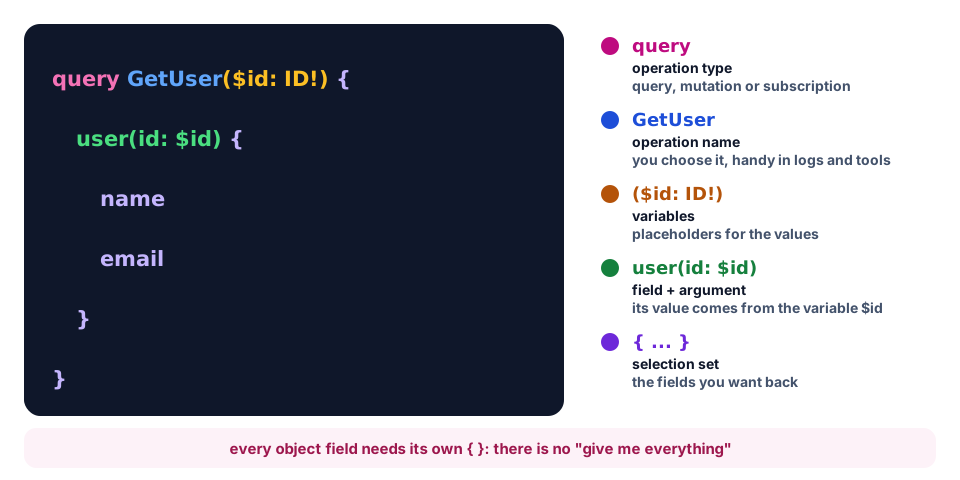
Selection sets can be nested as deep as you like — like the edges of the graph from the previous lesson: user { posts { comments { text } } }. There is one rule: a field that returns an object (user, posts) must have its own { … } set, and a scalar (name, email) must not. The query { user(id: "1") } without a selection set is an error: the server answers Field "user" of type "User" must have a selection of subfields. There is no "return everything" in GraphQL; you always list what you need.
If a query has neither a name nor variables, the word query can be dropped: { users { name } } — that is how we wrote it in the first lesson.
Arguments
Arguments pass parameters to a field, just like function arguments. They are written in parentheses after the field name: user(id: "1"). In the schema from the previous lesson user has one required id argument, and posts has one optional published argument. Let's request two root fields at once:
{
  user(id: "1") {
    name
  }
  posts(published: true) {
    title
  }
}
Values are written almost like in JSON: strings in double quotes, numbers, true, false and null as they are, lists as [1, 2, 3]. There are two differences: object keys are written without quotes, and enum values are written without quotes at all (orderBy: OLDEST). Arguments can be on nested fields too, not only on root ones.
A query can have as many root fields as you like, and each gets its own key in the response: data.user and data.posts. The server is free to run independent fields in parallel.
