
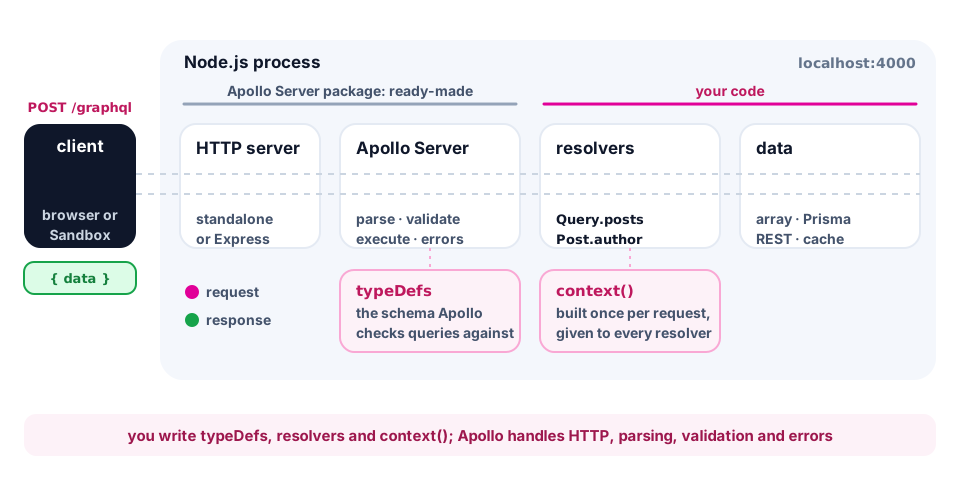
So far we have described a schema and written queries, but there was nowhere to run them: you need a real server. Picture a restaurant. The schema is the menu: what you can order. The resolvers are the cooks, and each one knows how to prepare their own dish. Apollo Server is the head waiter: it takes the order (the query), checks it against the menu, hands tasks to the cooks and brings the finished dishes to the client. In this lesson you will start such a "waiter" on Node.js, plug in the blog schema and open Apollo Sandbox, a browser playground for queries.
What you need
Apollo Server is the most popular GraphQL server for Node.js; you need version 5 and Node.js 20+. The @apollo/server package is the server itself, and graphql is the "engine" (GraphQL.js) that parses and executes queries. Apollo Server 5 works with graphql 16, while npm would install 17 by default and stop with an ERESOLVE error, so we pin the version explicitly: graphql@16. For TypeScript we add typescript, tsx (runs .ts files without a separate build) and @types/node:
mkdir blog-api && cd blog-api
npm init --yes && npm pkg set type="module"
npm install @apollo/server graphql@16
npm install -D typescript tsx @types/node
The npm pkg set type="module" command enables ES modules: you can write import and top-level await. Add the scripts "dev": "tsx watch src/index.ts" (restart on every save) and "typecheck": "tsc --noEmit" to package.json. In tsconfig.json enable strict, module: "nodenext", verbatimModuleSyntax, plus allowImportingTsExtensions with noEmit: then your own files can be imported with the .ts extension, like ./generated/prisma/client.ts in the Prisma topics. tsx does not check types; tsc --noEmit does.
Your first server in 20 lines
// src/index.ts
import { ApolloServer } from '@apollo/server';
import { startStandaloneServer } from '@apollo/server/standalone';

const typeDefs = `#graphql
  type Query {
    hello: String!
  }
`;

const resolvers = {
  Query: {
    hello: () => 'Hello, GraphQL!',
  },
};

const server = new ApolloServer({ typeDefs, resolvers });

const { url } = await startStandaloneServer(server, {
  listen: { port: 4000 },
});
console.log(`Server ready at ${url}`);typeDefsis the schema as a string in SDL. The#graphqlcomment does not affect the server, but it tells the editor to highlight the syntax.resolversis a "map" object: a type name (Query), a field name (hello) and a function that returns the data. That function is called a resolver.new ApolloServer({ typeDefs, resolvers })builds the server, andstartStandaloneServerstarts an HTTP server around it (no Express needed) and returns theurl.
Run npm run dev and the console prints Server ready at http://localhost:4000/. Open the address in a browser: this is Apollo Sandbox. Type { hello } into the operation panel and run it, and you get { "data": { "hello": "Hello, GraphQL!" } }. The docs and autocomplete are built from your schema automatically: that is the introspection from the first lesson.
💡 Sandbox is shown while
NODE_ENVis notproduction; in production a simple page replaces it and introspection is off by default (more in the security lesson).
