
In the last lesson the data lived in arrays and vanished when the server restarted. Now we connect a real database, PostgreSQL through Prisma, and along the way work out how GraphQL calls resolvers. Picture an assembly line: each worker receives a part from the previous station. The first builds the list of posts, the next ones finish each post with its author and comments. What the previous station passes on is the parent.
The resolver signature
Every resolver is a function (parent, args, contextValue, info):
| Parameter | What it is |
|---|---|
parent | what the parent field's resolver returned (in Post.author it is the post object) |
args | the field's arguments from the query ({ id: '1' } for user(id: "1")) |
contextValue | the request's shared object from the context function (for example, { prisma }) |
info | technical data: field name, path, schema; rarely needed |
A resolver returns a value, null or a Promise. If an object or an array of objects comes back, Apollo runs the resolvers of their nested fields, and so on down to the simplest values.
The resolver tree
A query is executed as a tree. Let us look at { posts { title author { name } } }:
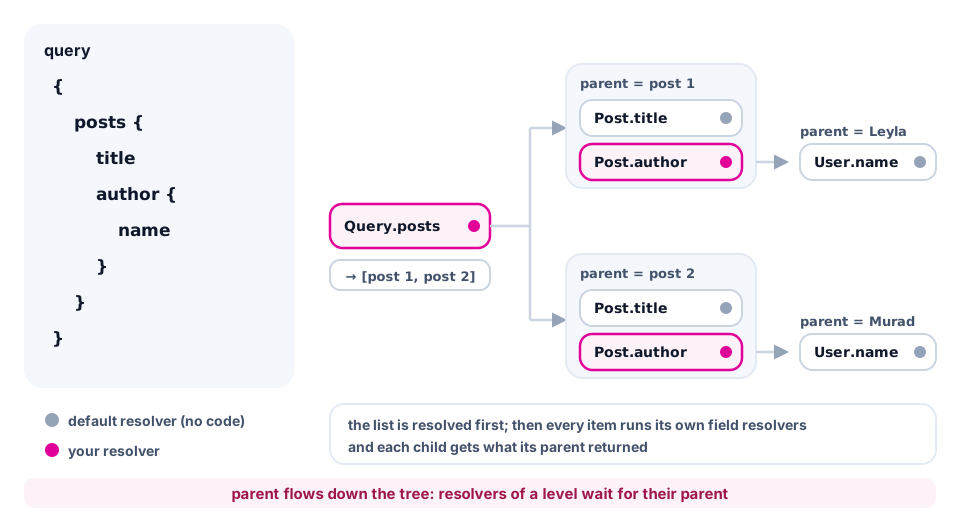
Query.postsis called once and returns the list of posts.Post.titleandPost.authorare called for each post: with 10 postsPost.authorruns 10 times. Remember this for the N+1 lesson.User.nameis called for each author; itsparentis the user thatPost.authorreturned.- A child resolver waits for its parent, while Apollo starts the fields of one level independently of each other.
Default resolvers
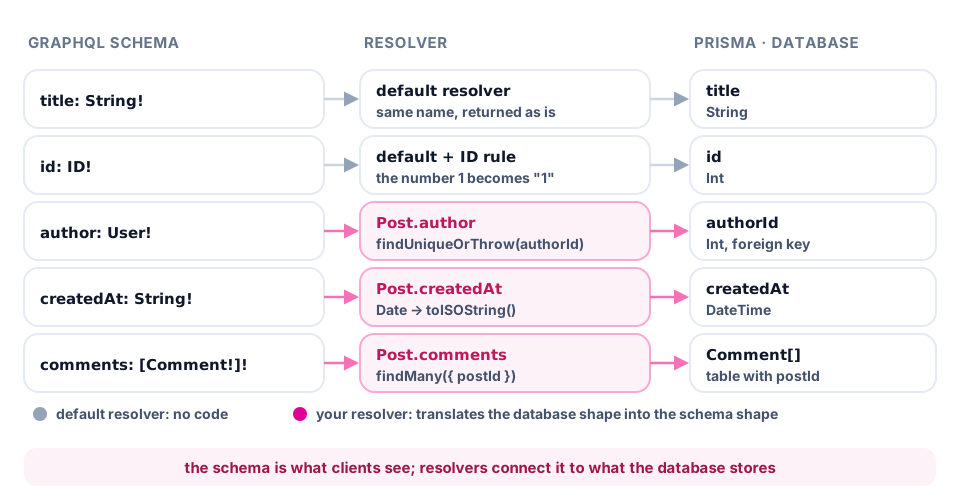
You do not need a resolver for every field. If there is none, GraphQL takes the property named like the field from parent, and if it is a function, calls it. That is why Post.title, Post.body and User.name work on their own: such properties are already in the row from the database. The ID scalar itself turns the number Post.id into the string "1". You need your own resolver in three cases:
- root fields (
Query.*): they have no parent, so we take the data from the database; - relations (
Post.author,User.posts,Post.comments): the row has onlyauthorId, or nothing at all; - fields in another format (
Post.createdAt): the database has aDate, the schema has aString.
Prisma in context
You set up Prisma ORM 7 in the databases section. Create a new database blog_graphql in the same PostgreSQL container and initialise Prisma:
npm install @prisma/client@7 @prisma/adapter-pg@7 pg
npm install -D prisma@7 dotenv
npx prisma init --datasource-provider postgresql --output ../src/generated/prisma --no-skills
Describe the models in prisma/schema.prisma, the same entities as in the GraphQL schema (without @map, for brevity), and then run npx prisma migrate dev --name init and npx prisma generate:
model User {
  id       Int       @id @default(autoincrement())
  name     String
  email    String    @unique
  posts    Post[]
  comments Comment[]
}