
Imagine a club with one front door. A guard checks your ID and gives you a wristband — that is authentication: "who are you?". Inside, each room has a staff member who looks at the wristband and decides whether to let you in — that is authorization: "what are you allowed to do?". In REST the "rooms" are routes, each closed with its own middleware. GraphQL has one door, /graphql, and the "rooms" are the fields of the schema, so the checks live in context and in resolvers. In this lesson the blog learns to recognize a user by a token, we protect other people's posts from edits, look at how GraphQL reports errors and defend the server against expensive queries.
One door, many rooms
| Authentication | Authorization | |
|---|---|---|
| Question | Who are you? | What may you do? |
| Where in GraphQL | context: once per request | resolvers: on every field |
The client sends a JWT in the header Authorization: Bearer <token> (you met JWT in the Node.js topic; the library is the same — jose). The server turns the token into a user or null and puts it into context; resolvers look at context.user.
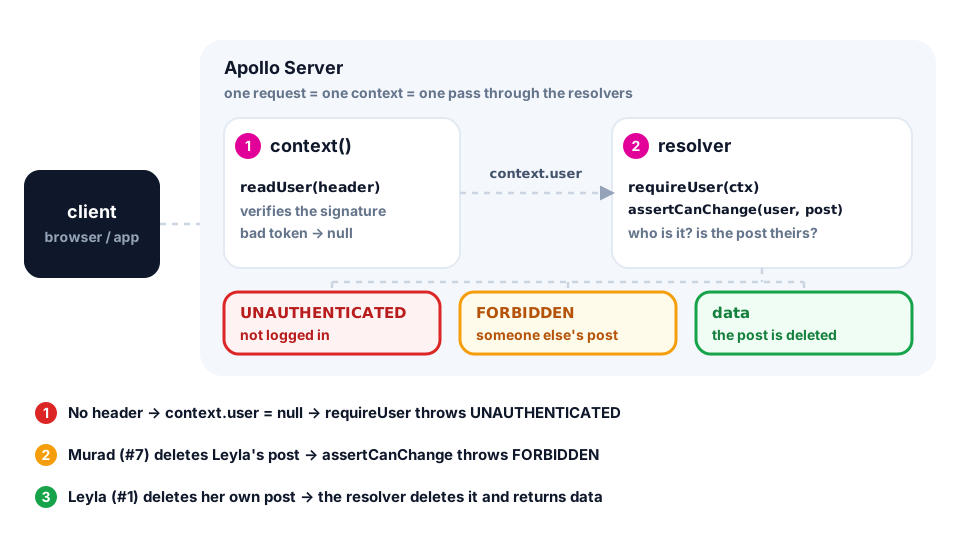
Step 1. Issue a token: the login mutation
Add passwordHash and role (the enum Role: USER, ADMIN) to the User model and run the migration. The schema gets login and me, and authorId leaves CreatePostInput: the client cannot be trusted to say "who I am", so the author comes from the token. The email field becomes optional — you will see why below. Install the libraries: npm install jose bcrypt and npm install -D @types/bcrypt.
type User {
  id: ID!
  name: String!
  email: String # optional on purpose, see below
  posts: [Post!]!
}

input CreatePostInput {
  title: String!
  body: String!
  published: Boolean = false # no authorId: the author is the logged-in user
}

input LoginInput { email: String!, password: String! }

type AuthPayload {
  token: String
  user: User
  errors: [UserError!]!
}

type Query {
  me: User # new, the other fields as before
}

type Mutation {
  login(input: LoginInput!): AuthPayload # new
}
tokens.ts issues and verifies tokens — the same SignJWT and jwtVerify as in the JWT topic; the secret lives in .env:
// src/auth/tokens.ts
import { SignJWT, jwtVerify } from 'jose';

const key = new TextEncoder().encode(process.env.JWT_SECRET); // 32+ characters

export type AuthUser = { id: number; role: 'USER' | 'ADMIN' };

export function signToken(user: AuthUser): Promise<string> {
  return new SignJWT({ role: user.role })
    .setProtectedHeader({ alg: 'HS256' })
    .setSubject(String(user.id))
    .setExpirationTime('2h')
    .sign(key);
}

export async function readUser(header?: string): Promise<AuthUser | null> {
  if (!header?.startsWith('Bearer ')) return null;
  try {
    const { payload } = await jwtVerify(header.slice(7), key, {
      algorithms: ['HS256'],
    });
    const id = Number(payload.sub);
    if (!Number.isInteger(id)) return null;
    return { id, role: payload.role === 'ADMIN' ? 'ADMIN' : 'USER' };
  } catch {
    return null; // expired, forged or broken: treat as anonymous
  }
}