
Last time a single consumer read the events. But the shop is growing: every order produces the events OrderCreated, OrderPaid and OrderShipped, and the notification service can no longer keep up with the emails. We want to run several copies of the service and split the work so that no event is processed twice. On top of that, analytics needs the same events and must not get in the way of the emails. Consumer groups solve all of this. We will also find out what happens when a failure strikes between processing and saving the bookmark, and how to read events again.
A consumer group
All consumers with the same groupId form a group. Kafka divides the partitions of a topic among the members of the group so that every partition has exactly one reader from the group at any moment. An analogy: three checkout lanes in a shop (partitions) and cashiers (consumers). One cashier serves each lane, otherwise the line of customers would get mixed up; one cashier may serve two lanes, and an extra cashier is left without a lane.
| Consumers in the group | Who reads what (an example for 3 partitions) |
|---|---|
| 1 | A: partitions 0, 1, 2 |
| 2 | A: 0 and 2, B: 1 |
| 3 | A: 0, B: 1, C: 2 |
| 4 | three read one each, the fourth sits idle |
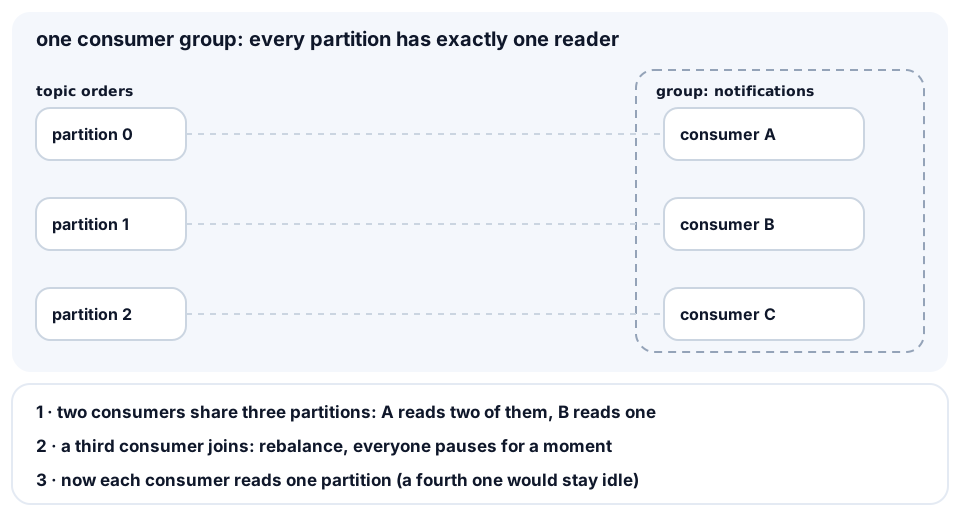
This gives the scaling rule: you cannot read in parallel with more consumers than there are partitions. If you want eight copies of a service, you need at least eight partitions. Here is a consumer that shows which partitions it got:
import { Kafka } from 'kafkajs';

const name = process.argv[2] ?? 'A';
const kafka = new Kafka({
  clientId: `notifications-${name}`,
  brokers: ['localhost:9092'],
});
const consumer = kafka.consumer({ groupId: 'notifications' });

consumer.on(consumer.events.GROUP_JOIN, ({ payload }) => {
  const mine = payload.memberAssignment.orders ?? [];
  console.log(name, 'got partitions', mine);
});

await consumer.connect();
await consumer.subscribe({ topic: 'orders', fromBeginning: true });
await consumer.run({
  eachMessage: async ({ partition, message }) => {
    const event = JSON.parse(message.value.toString());
    console.log(name, `p${partition}`, event.type, event.orderId);
  },
});
Run it in two terminals: node group.js A and node group.js B. The output may look like this (which consumer gets which partitions depends on the algorithm; the service JSON lines of kafkajs are omitted):
A got partitions [ 0, 2 ]
B got partitions [ 1 ]
A p2 OrderCreated 3
B p1 OrderCreated 4
A p0 OrderCreated 5
Start a third one and the group redistributes the partitions:
A got partitions [ 0 ]
B got partitions [ 1 ]
C got partitions [ 2 ]