
Prowid Photos has three API instances behind a load balancer, but only one database: PostgreSQL. At peak 350 requests per second arrive, and each of them goes to the database for a photo card or an author profile, even though photos do not change for weeks. A cache is a temporary copy of data kept where it is faster to get. We will see where caches live on a request's path, how to measure their benefit, which strategies exist, how to keep data fresh, how to survive a popular key expiring, and how CDNs and Cache-Control work.
Why cache: numbers first
Think of a desk and an archive. Papers you need every hour lie on the desk: quick to grab, little space. The rest is in the basement archive: lots of room, a long walk. A cache is the desk. If you find what you need in the cache, that is a cache hit; if not, it is a cache miss and you have to go to the source, the database. The share of hits is the hit ratio.
Only misses reach the database: peak × (1 − hit ratio). The average latency is hit × t(hit) + (1 − hit) × t(miss). Say a Redis read takes about 2 ms, and a miss means a 40 ms PostgreSQL query plus saving the value to the cache, about 44 ms:
const peakRps = 350;
const hitMs = 2; // Redis lookup inside the data center
const missMs = 44; // lookup + 40 ms DB query + saving the value

for (const hit of [0, 0.5, 0.9, 0.99]) {
  const avgMs = hit * hitMs + (1 - hit) * missMs;
  const dbRps = peakRps * (1 - hit);
  const pct = Math.round(hit * 100);
  const line = `${pct}% hits: ${avgMs.toFixed(1)} ms`;
  console.log(`${line}, DB ${dbRps.toFixed(1)} RPS`);
}| Hit ratio | To the database at 350 RPS peak | Average response |
|---|---|---|
| 0% | 350 RPS | 44 ms |
| 50% | 175 RPS | 23 ms |
| 90% | 35 RPS | 6.2 ms |
| 99% | 3.5 RPS | 2.4 ms |
Every extra "nine" in the hit ratio cuts the database load several times over: from 90% to 99% it is ten times. But a cache buys speed with freshness and simplicity: data can go stale, and one more component can be forgotten on updates. Cache what is read often, changes rarely and tolerates some lag. Do not cache data read once, or anything that must never be stale, such as an account balance.
Where a cache lives: five layers
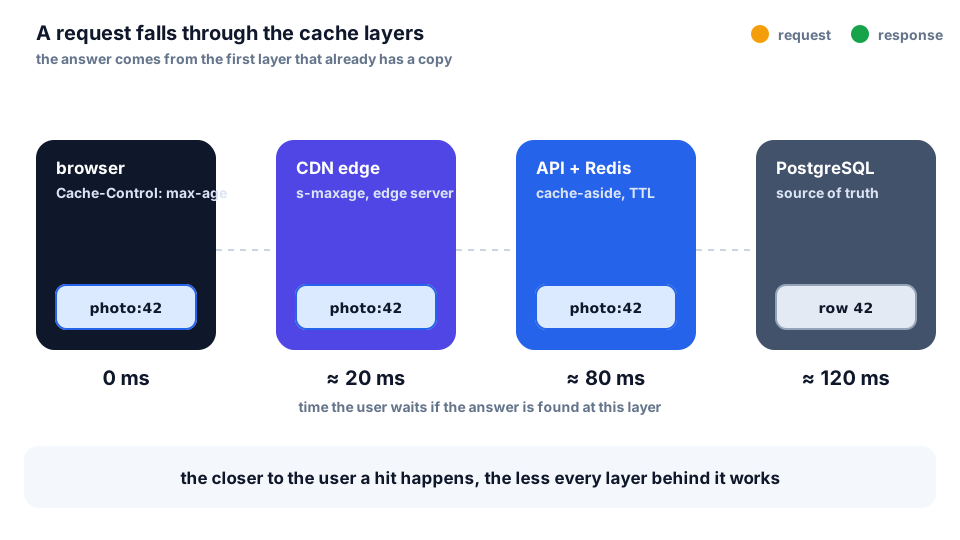
A request falls down the layers and stops at the first one with a copy:
- Browser. The copy is on the device, no network at all; controlled by the
Cache-Controlheader. It is personal: Leyla has her own, Murad has his. - CDN. Servers all over the world, close to people. One cache for everyone in a region; ideal for images and public API responses.
- Reverse proxy. Nginx in front of the app can store responses (
proxy_cache) and shield the API from repeated requests. - Application cache. Redis: ready-made objects and query results, a response in 1–2 ms.
- Database. PostgreSQL keeps hot pages in memory itself (
shared_buffersand the OS cache).
The closer a layer is to the user, the less the user waits, but the harder freshness is to control: you cannot delete a copy from a million browsers. What we cache where in Prowid Photos:
