
Nigar got her first real task — PS-41, the “Add to cart” button. She can write code, but between “the task is assigned” and “it works in production” there is a whole chain of habits and agreements that no programming-language textbook has: how to ask questions, name branches, format a pull request and answer a review. These are what make a developer easy to work with. Let's walk the path step by step.
The path of a task: from ticket to production
The tools vary — Jira, GitHub Projects, Linear, GitLab — but the path is almost the same everywhere:
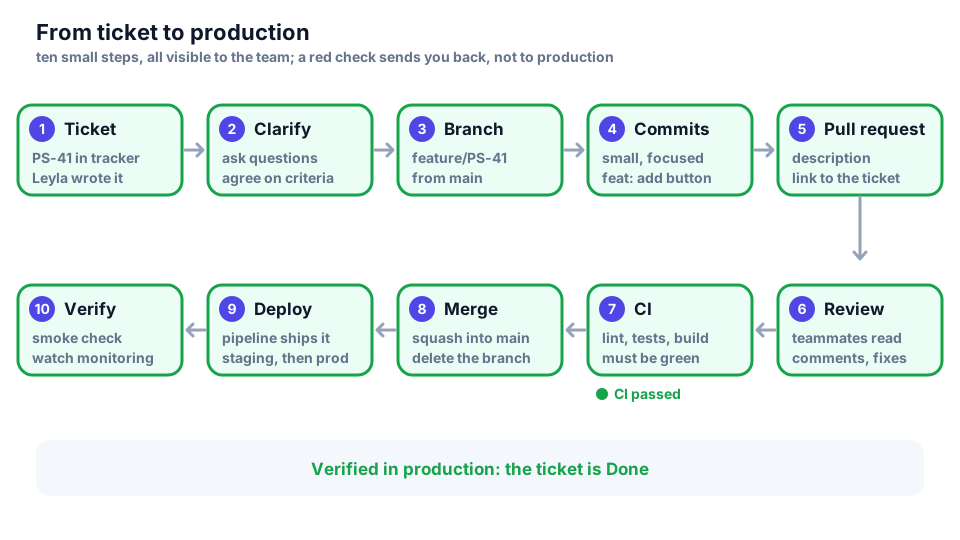
- Ticket — Leyla described the value and the acceptance criteria.
- Clarify — you ask questions until everything is clear.
- Branch — a separate branch from a fresh
main. - Commits — small, with clear messages.
- Pull request — a description for the reviewer.
- Review — teammates read and comment.
- CI — automatic checks: the linter, tests, the build.
- Merge — merging into
main. - Deploy — the pipeline ships the change to staging and production.
- Verify — we make sure everything works in production.
Every step is small and visible to the whole team, so a mistake is caught early and cheaply. A red CI sends you back to the commits instead of sending a bug to production.
Definition of Ready and Definition of Done
These are two “borders” of a task: when it can be taken and when it counts as finished.
| Ready — can be taken | Done — can be closed |
|---|---|
| It is clear why the task is needed | The code is reviewed by a teammate |
| There are acceptance criteria | Tests are written and pass, CI is green |
| The size is estimated and fits into a Sprint | The acceptance criteria are met |
| Dependencies are known (access, API, design) | Deployed and checked on staging |
| There is a mockup or an example of the result | README and docs are updated if needed |
The Definition of Done is described in the Scrum Guide; the Definition of Ready is a popular team practice. The idea is one: an unclear task is not started, and an unfinished task is not closed. If a task is not Ready, do not guess — ask.
How to ask questions
A good question saves time for both: it can be answered at once, without counter-questions. A template: context → what we tried → what we expected and what we got → a specific question.
Bad:
  hey, quick question
  the cart doesnt work, can you help?

Good:
  PS-41: "Add to cart" does nothing on staging.
  I checked: POST /cart/items returns 401 in
  the Network tab. My token works in Postman.
  Does staging use a different auth header?
A rule of thumb: try to figure it out yourself for 30–60 minutes, then ask — and no later. While you write the question down, the answer is often found by itself. And a message like “hi, can I ask something?” without the question itself makes the other person wait twice: write the point right away.
Branch and commits
A branch is created from a fresh main and has the ticket key in its name: the name shows which task it is about, and the tracker links the branch to the ticket by itself.
git switch main && git pull
git switch -c feature/PS-41-add-to-cart