
Do you need a library
Every npm install is bytes for the user, a dependency to keep updated and a security surface. A utility library pays off when there is no built-in answer or your own version would be risky. Three questions: can the platform do it? Is one function enough? How much does the bundle grow?
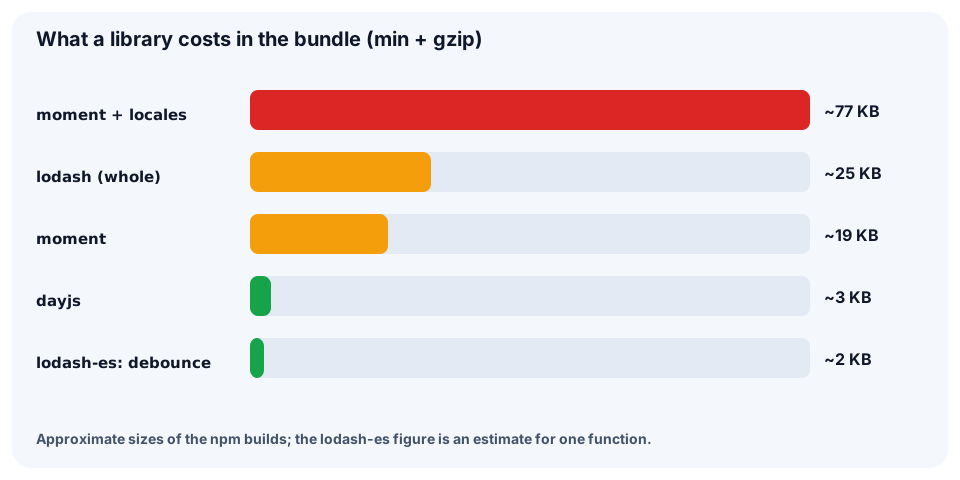
The numbers are min + gzip sizes of the npm packages (approximate, version dependent). Check the real size in your project's bundle report (vite-bundle-visualizer, webpack-bundle-analyzer).
💡 Rule: compare the build size before and after adding a library and put the difference in the PR description.
lodash-es: the right import
lodash is a CommonJS package: import _ from 'lodash' pulls in the whole library (about 25 KB gzip). lodash-es is the same functions as ES modules and the bundler drops the unused ones (tree shaking). Install with npm i lodash-es.
import _ from 'lodash';

// the whole CommonJS library lands in the bundle
console.log(_.chunk([1, 2, 3, 4], 2).length);

// better
import { chunk } from 'lodash-es';

// ES modules: only chunk and its helpers are bundled
console.log(chunk([1, 2, 3, 4], 2).length);
An alternative is import debounce from 'lodash/debounce' (one file from the CommonJS package). With modern bundlers lodash-es is simpler.
⚠️
import * as _ from 'lodash-es'and chains like_.chainbreak tree shaking. Import functions by name.
The most useful functions
Everyday collection work: grouping, lookups, sorting, sums. A string path ('city') equals o => o.city.
import { groupBy, keyBy, sortBy, sumBy } from 'lodash-es';

const orders = [
  { id: 1, city: 'Baku', total: 40 },
  { id: 2, city: 'Ganja', total: 15 },
  { id: 3, city: 'Baku', total: 25 },
];