
The audio graph
The Web Audio API processes sound as a graph of nodes. A source produces a signal, effect nodes change it, and the last node sends it to the speakers.
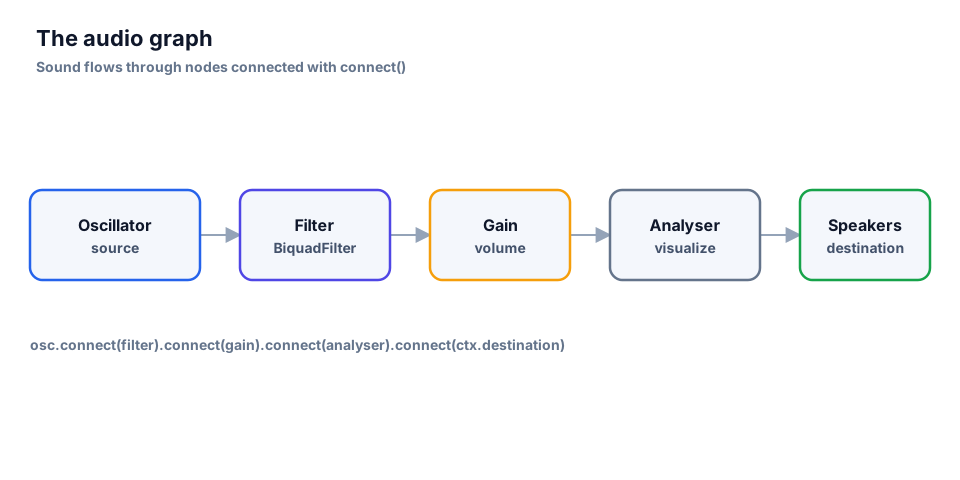
AudioContextis the container and the clock for all audio work.ctx.currentTimeis the time in seconds.- Sources:
OscillatorNode(a synthesized wave) andAudioBufferSourceNode(a sample). - Effects:
GainNode(volume),BiquadFilterNode(filter),StereoPannerNode(balance). AnalyserNodeonly measures the signal;ctx.destinationis the output.AudioParamvalues such asgain.gainandosc.frequencycan be changed on a schedule.
Nodes are joined with connect(), which returns the node it was given, so chains read left to right.
AudioContext and the autoplay policy
const ctx = new AudioContext();

startButton.addEventListener('click', async () => {
  if (ctx.state === 'suspended') {
    await ctx.resume();
  }
  beep();
});
Browsers block sound until the user interacts with the page. A context created earlier starts in the suspended state. Call ctx.resume() inside a click, tap or key handler and start sound from there.
⚠️ If
resume()is called outside a user gesture its promise may never settle. Show a "Start" button instead of trying to play on load.
Oscillator, gain and envelope
An OscillatorNode generates a wave: sine, square, sawtooth or triangle. The frequency is in hertz; 440 Hz is the note A.
