
Laravel Socialite reduces OAuth 2 sign-in (GitHub, Google, Facebook and others) to a few methods. The user creates no password and you receive a profile verified by the provider.
How it works
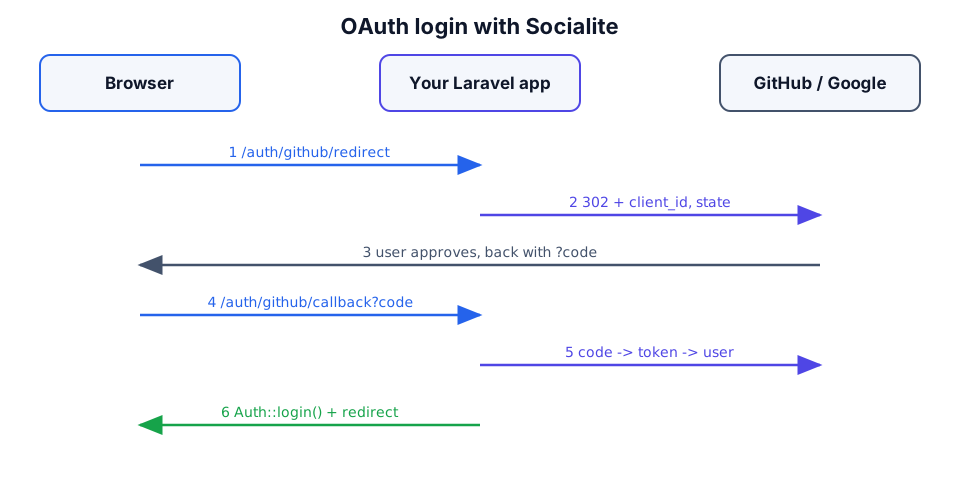
The flow has six steps: the user clicks the button, the app redirects to the provider, the user consents, the provider returns to the callback with a code, and the app exchanges the code for a token and fetches the profile.
Installation and setup
composer require laravel/socialiteCreate an OAuth app in the provider dashboard (GitHub: Settings → Developer settings → OAuth Apps; Google: Cloud Console → Credentials), register the callback URL and put the keys into .env:
GITHUB_CLIENT_ID=your-github-client-id
GITHUB_CLIENT_SECRET=your-github-client-secret
GOOGLE_CLIENT_ID=your-google-client-id
GOOGLE_CLIENT_SECRET=your-google-client-secret// config/services.php
'github' => [
'client_id' => env('GITHUB_CLIENT_ID'),
'client_secret' => env('GITHUB_CLIENT_SECRET'),
'redirect' => '/auth/github/callback',
],
'google' => [
'client_id' => env('GOOGLE_CLIENT_ID'),
'client_secret' => env('GOOGLE_CLIENT_SECRET'),
'redirect' => '/auth/google/callback',
],⚠️ The callback URL must match the one at the provider character for character (http/https, port, path).
