
In a small office with twenty computers, every cable runs to a single switch plugged into the provider's router. But when a corporate campus spans three buildings, two thousand employees, PoE IP phones, security cameras, and a server farm, a flat chain of switches turns into an unmanageable tangle: a single misplaced patch cord or a severed fiber strand can take down connectivity across an entire building. In this lesson we examine how enterprise networks are divided into three predictable hierarchical tiers — Access, Distribution, and Core, when a two-tier Collapsed Core design is sufficient, and how to use the Oversubscription formula to calculate the exact number and speed of uplink ports.
Goal and prerequisites
After this lesson you will be able to:
- explain the purpose of each of the three tiers in the classic Cisco hierarchical model (
Access,Distribution,Core) and state which functions belong at each tier and which are forbidden; - choose between a
Three-Tierarchitecture, a two-tierCollapsed Coremodel, and a campus fabric based on building count, access-switch scale, and port budget; - explain the three engineering benefits of modular design: block-by-block scalability,
Failure Domaincontainment, and predictable traffic paths; - calculate the
Oversubscription RatioforAccess → DistributionandDistribution → Corelinks and compare it against Cisco's target guidelines (20:1and4:1); - size uplink port counts and speeds (
10G,25G,40G,100G) for a floor switch stack and verify interface utilization usingshow interfaces statusandshow interfaces summary.
Prerequisites: the ccna foundation — LAN switching, VLAN segmentation, 802.1Q trunks, EtherChannel link aggregation, STP fundamentals, and OSPF routing.
A real-life task
The headquarters campus of a logistics company in Baku has four floors. Each floor has a stack of two 48-port gigabit Cisco Catalyst 9200 switches (96 client ports at 1 Gbps per floor). Two Catalyst 9500 distribution switches sit in the first-floor server room. During installation, the contractor connected each floor stack to the server room using only two 1 Gbps copper patch cords (one to each distribution switch).
At 09:30 AM, when employees open cloud spreadsheets, join video meetings, and copy CAD drawings from the file server, voice calls stutter and file transfers drop to a few megabits per second. The IT Director asks: why are 96 gigabit ports choking on two gigabit links, what is the current oversubscription ratio, and how many 10G SFP+ optical modules must be installed to meet Cisco's 20:1 engineering standard even when one distribution switch is down for maintenance? We will solve this step by step in the worked examples.
Why a flat campus network does not scale
When switches are daisy-chained from floor to floor, the network loses predictability for three reasons:
- Wide Failure Domain. A reboot or power supply failure on an intermediate switch on the second floor cuts off the third and fourth floors from the server room.
- Transit traffic through user switches. Traffic from upper floors traverses the buffers and switching backplane of lower-floor switches, stealing bandwidth from local users.
- Harder troubleshooting and change control. To find where packets are dropped or why the
STPtree reconverged, an engineer must inspect dozens of daisy-chained switches instead of a clean boundary.
Hierarchical design replaces arbitrary chains with a strict pyramid: every device belongs to exactly one tier and connects only to its adjacent tier.
The Three-Tier Hierarchical Model: Access, Distribution, Core
The classic Cisco Enterprise Campus Architecture divides the campus into three functional tiers.
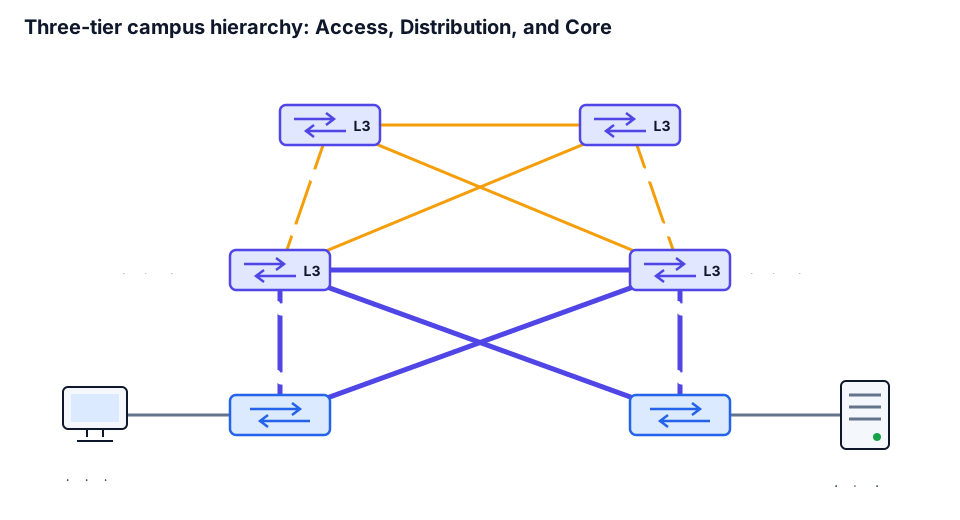
- Access Layer — the network edge where end devices connect: workstations, IP phones, Wi-Fi access points, printers, and cameras. Its responsibilities are
VLANassignment,PoE/PoE+power delivery, first-hop port security (Port Security,DHCP Snooping,802.1X), and ingressQoSmarking. - Distribution Layer (Aggregation) — the intelligent boundary between floor switching and the high-speed core. Floor
VLANs terminate here (SVIdefault gateways and gateway redundancy protocols), access control lists (ACL) enforce security policy, and routes are filtered and summarized before being advertised into the core. - Core Layer (Campus Backbone) — the high-speed L3 switching backbone interconnecting building blocks, the data center, and the
WAN/Internetedge. The golden rule of the core is no packet filtering, no user ACLs, no deep inspection, and no slow software processing. TheCoreexists to forward aggregated IP flows at wire speed (40G/100G) with minimal latency and sub-second convergence when a fiber link fails.
| Tier | Typical Cisco Platforms | Primary Functions | What Must Be Avoided Here |
|---|---|---|---|
Access | Catalyst 9200 / 9300 (24–48 × 1G/mGig, PoE+) | Host connectivity, VLANs, PoE, port security, ingress QoS classification | Transit routing between other buildings |
Distribution | Catalyst 9500 / 9400 (10G/25G/40G) | Access uplink aggregation, L2/L3 boundary, SVI gateways, ACL policy, route summarization | Direct connection of user PCs and printers |
Core | Catalyst 9500 High-Performance / 9600 (40G/100G) | Ultra-fast L3 transport between Distribution blocks, Data Center, and WAN Edge | User ACLs, PoE delivery, stretching floor VLANs |
➡️ Where exactly to place the boundary between Layer 2 and Layer 3 (traditional switched access versus Routed Access all the way to the floor switch) is covered in lesson 2.
Worked example: packet path and failure containment in a three-tier campus
Using the first diagram, let us trace a packet from a workstation in VLAN 10 (10.10.10.0/24, connected to ASW1) to an internal server in VLAN 20 (10.10.20.0/24, connected to ASW2) and evaluate the failure domain of each device:
Path: PC1 (10.10.10.50) -> ASW1 (Gi1/0/1 -> Te1/1/1)
                        -> DSW1 (L3 gateway for VLAN 10, routes to 10.10.20.0/24)
                        -> CORE1 (Fo1/0/1 -> high-speed L3 transit)
                        -> DSW2 (L3 gateway for VLAN 20)
                        -> ASW2 (Te1/1/2 -> Gi1/0/1) -> SRV1 (10.10.20.10)

Failure domain analysis:
  1. ASW1 fails         -> only users on ASW1 lose link; ASW2 and other floors work normally
  2. Link ASW1-DSW1 cut -> ASW1 shifts traffic to backup uplink ASW1-DSW2
  3. DSW1 fails         -> DSW2 takes over gateway role and forwards via CORE1/CORE2
  4. CORE1 fails        -> DSW1 and DSW2 forward all inter-block traffic through CORE2
Because Distribution and Core switches are deployed in redundant pairs and every ASW has dual uplinks split across DSW1 and DSW2, no single cable cut or distribution switch failure isolates a floor.
Two-Tier (Collapsed Core) vs. Three-Tier Design
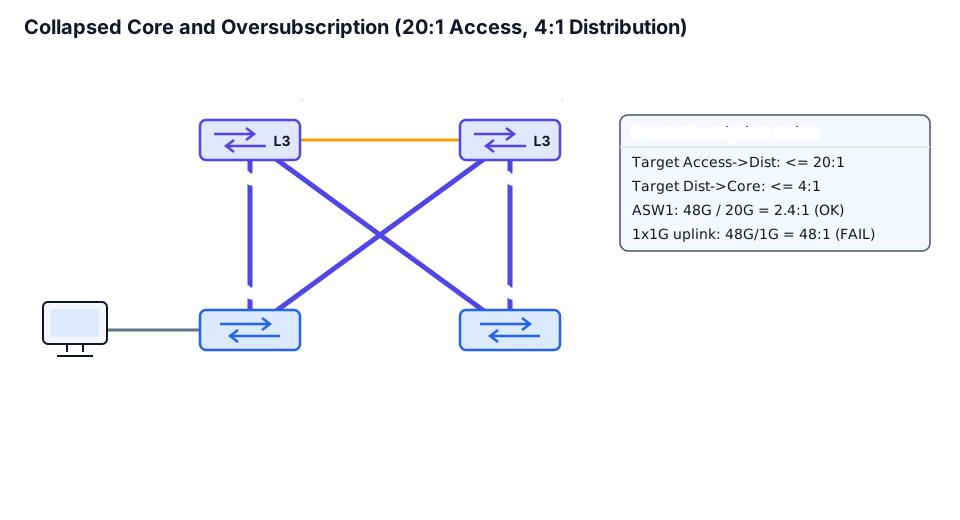
Not every enterprise needs a dedicated Core tier. When a campus consists of one or two buildings with 3 to 15 floor access switches, the Distribution and Core layers are combined into a single pair of high-speed L3 switches. This architecture is called a Collapsed Core (Two-Tier) design.
| Selection Criterion | Two-Tier (Collapsed Core) | Three-Tier (Access + Distribution + Core) |
|---|---|---|
| Campus scale | 1–2 buildings, up to 10–20 access switches (up to ~1000 ports) | Multiple buildings, > 20 access switches, dedicated Data Center and WAN blocks |
Fiber links between Distribution blocks | A single pair CD-SW1 / CD-SW2 connected directly | With N buildings and no Core, a full mesh requires N × (N − 1) / 2 fiber pairs; with Core, only 2 × N |
| Cost and latency | Fewer chassis and optical transceivers, one fewer L3 hop | Higher initial cost, but adding a new building never disturbs existing building blocks |
Consider the fiber savings across buildings: if a campus has 6 buildings each with a pair of distribution switches, interconnecting every building directly requires 6 × 5 / 2 = 15 inter-building trunks (30 redundant fiber paths). Adding a central pair of Core switches turns the topology into a clean hub-and-spoke star where each building connects its two DSW switches to CORE1 and CORE2.
Capacity Planning and the Oversubscription Ratio
Why doesn't a 48-port gigabit access switch need 48 gigabits of uplink bandwidth? Because office endpoints never transmit at 1 Gbps simultaneously 100% of the time. The ratio of total downstream client port bandwidth (downlink) to total active upstream bandwidth (uplink) is the Oversubscription Ratio:
Oversubscription Ratio = Total Downlink Bandwidth / Total Active Uplink BandwidthCisco Validated Design (CVD) guides establish two standard engineering targets for enterprise campuses:
- At
Access → Distribution: no worse than20:1(for standard office workspaces and IP telephony; for dense engineering labs and Wi-Fi 6/6E access points,10:1or better is recommended). - At
Distribution → Core: no worse than4:1(traffic from multiple floors is already aggregated here, so concurrent bursts occur much more frequently).
➡️ How the switch's hardware forwarding table resolves the egress port and L2 header in nanoseconds is covered in lesson 3.
Worked example: sizing uplinks for a floor stack (solving the real-life task)
Let us return to the logistics company from the beginning of the lesson. Each floor stack has two switches with 48 ports at 1 Gbps (96 client ports = 96 Gbps total downlink). Let us compare three uplink options toward DSW1 and DSW2:
Given:
  Access ports per floor stack = 2 x 48 x 1 Gbps = 96 Gbps

Case A (contractor's mistake: 2 x 1 Gbps uplinks, both active):
  Active uplink bandwidth = 2 Gbps
  Oversubscription = 96 Gbps / 2 Gbps = 48:1   --> 2.4x worse than 20:1 limit!
  If DSW1 fails (1 Gbps left): 96 / 1 = 96:1   --> severe congestion and packet drops.

Case B (upgrade to 2 x 10 Gbps SFP+ uplinks: 1x10G to DSW1, 1x10G to DSW2):
  Normal state (both 10G active): 96 Gbps / 20 Gbps = 4.8:1   (passes <= 20:1)
  Failover state (DSW1 down, 1x10G active): 96 Gbps / 10 Gbps = 9.6:1 (still passes <= 20:1!)

Case C (Distribution to Core for 4 floors, each floor sends 20 Gbps to DSW pair):
  Total downlink on DSW block = 4 floors x 20 Gbps = 80 Gbps
  Target Dist -> Core ratio <= 4:1 -> minimum Core uplink = 80 Gbps / 4 = 20 Gbps
  Choosing 2 x 40 Gbps (1x40G to CORE1, 1x40G to CORE2):
    Normal state:   80 Gbps / 80 Gbps = 1:1
    CORE1 failure:  80 Gbps / 40 Gbps = 2:1 (passes <= 4:1 even during Core switch maintenance!)
Conclusion for the IT Director: replacing the two gigabit patch cords with two 10GBASE-SR SFP+ optical links (one to DSW1, one to DSW2) brings oversubscription down from a congested 48:1 to 4.8:1 under normal operation and 9.6:1 during a distribution switch failure — twice as good as the 20:1 ceiling.
Worked example: verifying port speeds and utilization on Cisco IOS XE
To verify on a live Catalyst 9300 which interfaces operate as 1G client ports versus 10G uplinks, and whether high oversubscription is causing Output Drops, run show interfaces status and show interfaces <id>:
ASW1# show interfaces status
Port         Name               Status       Vlan       Duplex  Speed Type
Gi1/0/1      User-PC-01         connected    10         a-full  a-1000 10/100/1000BaseTX
Gi1/0/2      User-PC-02         connected    10         a-full  a-1000 10/100/1000BaseTX
...
Gi1/0/48     Floor-Printer      connected    10         a-full  a-1000 10/100/1000BaseTX
Te1/1/1      UPLINK-TO-DSW1     connected    trunk      full    10G    SFP-10GBase-SR
Te1/1/2      UPLINK-TO-DSW2     connected    trunk      full    10G    SFP-10GBase-SR

ASW1# show interfaces TenGigabitEthernet1/1/1
TenGigabitEthernet1/1/1 is up, line protocol is up (connected)
  Hardware is Ten Gigabit Ethernet, address is 0050.56bf.1081 (bia 0050.56bf.1081)
  Description: UPLINK-TO-DSW1
  MTU 1500 bytes, BW 10000000 Kbit/sec, DLY 10 usec,
     reliability 255/255, txload 18/255, rxload 12/255
  Input queue: 0/2000/0/0 (size/max/drops/flushes); Total output drops: 0
  5 minute input rate 472000000 bits/sec, 58100 packets/sec
  5 minute output rate 715000000 bits/sec, 84200 packets/sec
Look at four key counters in show interfaces TenGigabitEthernet1/1/1:
BW 10000000 Kbit/sec— nominal bandwidth10,000,000 Kbit/s=10 Gbps;txload 18/255— transmit load as a fraction of255(18 / 255 ≈ 7%), meaning plenty of headroom;Total output drops: 0— zero packets dropped due to egress buffer exhaustion;- on a
1Glink, a715 Mbpsaverage flow with microbursts would rapidly incrementTotal output dropsinto tens of thousands of packets.
What can go wrong and how to find it
| Symptom | Probable Cause | What to Check |
|---|---|---|
| During peak hours all users on a floor experience slow transfers and choppy voice/video | Excessive oversubscription (> 20:1) on the uplink, or one of the two uplinks is blocked by STP | show interfaces status, show interfaces <uplink> (Total output drops), show spanning-tree |
Powering off one Access switch disconnects a neighboring room | Hierarchy violation: the second switch is daisy-chained into a user port of the first switch instead of connecting to Distribution | show cdp neighbors detail / show lldp neighbors on the access switches |
High CPU utilization and latency spikes on Core switches | Long user ACLs or packet inspection were configured on the Core tier instead of the Distribution tier | show running-config on Core (check ip access-group), show processes cpu sorted |
During planned maintenance of DSW1, the surviving link to DSW2 saturates at 100% (txload 255/255) | Oversubscription was calculated only for normal operation without accounting for single-switch failover (N+1) | Recalculate Total Downlink / Remaining Uplink with one DSW down (must remain ≤ 20:1) |
⚠️ Common design pitfall: calculating the oversubscription ratio using the sum of all physical uplink cables while forgetting that in a traditional Layer 2 topology with
STP, half of the single trunks toward the standby distribution switch sit inBlocking / Alternatestate and carry zero user traffic! To keep all uplinks forwarding simultaneously, engineers either balance VLAN roots across the two distribution switches, bundle links into a multi-chassis EtherChannel, or use routed (L3) uplinks.
Practice
- Predict. Access switch
ASW3has24client ports at1 Gbpsand one active1 Gbpsuplink toDSW1(its second1 Gbpslink toDSW2is blocked bySTP). Does this design meet Cisco's20:1target? - Verify. Calculate the oversubscription ratio for a stack of
3switches with48 × 1 Gbpsports each when4active10 Gbpsuplinks connect the stack to the distribution tier. - Explain. Why should traffic filtering between a guest network and an internal server subnet be placed at the
Distributiontier rather than theCoretier in a three-tier campus? - Modify. A new CAD engineering floor receives a switch with
48multigigabit ports at2.5 Gbps(mGig). What total active uplink bandwidth (and how many10Gor25Gports) must be provisioned so that oversubscription never exceeds10:1even when one of the two distribution switches fails? - Build it yourself ⭐. Design the hierarchy for a university campus with
4academic buildings, each containing6floor stacks (96 × 1 Gbpsper stack). Choose the model (Collapsed CoreorThree-Tier), size the uplinks from each stack toDistribution(≤ 20:1with oneDSWdown), and size the backbone links from each building toCore(≤ 4:1with oneCoreswitch down).
Self-check
Question 1. In a five-building campus, an administrator wants to block traffic from the student subnet 10.50.0.0/16 to the finance servers 10.10.20.0/24. At which hierarchical tier should the ACL policy be applied to avoid wasting backbone bandwidth and drop unauthorized traffic closest to its source?
- Breakdown: At the
Distribution Layerof the academic building where the student subnet's default gateway terminates. Applying the filter at theCorewould allow unwanted packets to consume building-to-core uplinks and would violate the core's pure high-speed forwarding principle.
Question 2. In show interfaces TenGigabitEthernet1/1/1 you observe BW 10000000 Kbit/sec, txload 242/255, and Total output drops: 184920. What do these three values tell you?
- Breakdown: The interface is a
10 Gbpslink running at242 / 255 ≈ 94.9%transmit utilization, and its egress queue has already dropped184,920packets due to uplink congestion.
Answers to Practice:
- No: total downlink bandwidth is
24 × 1 = 24 Gbps, while active uplink bandwidth is only1 Gbps(the second link is blocked bySTP). The resulting oversubscription is24:1, which exceeds the20:1maximum. - Total downlink:
3 × 48 × 1 = 144 Gbps. Active uplink:4 × 10 = 40 Gbps. Oversubscription ratio:144 / 40 = 3.6:1(during a singleDSWfailure with two10Glinks remaining, it becomes144 / 20 = 7.2:1, still well within20:1). - The
Distributiontier already inspects L3/L4 headers for inter-VLAN routing and aggregates a single building, whereas theCoreinterconnects all buildings and must forward packets at maximum speed without evaluating complex policy lists. - Total downlink:
48 × 2.5 = 120 Gbps. To keep oversubscription at or below10:1when oneDSWfails, the surviving uplink leg needs at least120 / 10 = 12 Gbps. Therefore, provision either2 × 10GperDSW(20 Gbpsper leg,40 Gbpstotal) or1 × 25G(SFP28,25 Gbpsper leg,50 Gbpstotal). With2 × 25G, normal oversubscription is120 / 50 = 2.4:1and failover oversubscription is120 / 25 = 4.8:1. - For
4buildings and24stacks, choose aThree-Tierarchitecture: aDSWpair in each building and a centralCORE1 / CORE2pair. Give each stack (96 Gbps)2 × 10Guplinks (one10Gto each buildingDSW):96 / 20 = 4.8:1normal,9.6:1failover (≤ 20:1). Total bandwidth from6stacks into a building'sDistributionblock is6 × 20 = 120 Gbps. ForDistribution → Core ≤ 4:1with oneCoreswitch down, the surviving core link needs at least120 / 4 = 30 Gbps. Provision1 × 40G(or1 × 100G) from each building toCORE1andCORE2:120 / 80 = 1.5:1normal,120 / 40 = 3:1failover (≤ 4:1).
Review and the criterion for moving on
You are ready to move on if, without hints, you can:
- name all three campus tiers (
Access,Distribution,Core) and list at least three functions of each; - explain when a two-tier
Collapsed Coredesign is preferable to a three-tier design and when a dedicatedCoretier is required; - write the oversubscription formula, state the
20:1and4:1targets, and account for single distribution switch failover when sizing uplinks; - locate link bandwidth (
BW), utilization (txload/rxload), and egress queue drops (Total output drops) inshow interfacesoutput.
Review question (CCNA foundation): why does Spanning Tree Protocol (STP) block one of the two ports when two switches are connected by two parallel patch cords without EtherChannel?
Standards and sources
- Cisco Validated Design (CVD) — Campus LAN and Wireless LAN Solution Design Guide (Three-Tier vs. Collapsed Core, Oversubscription ratios
20:1Access-to-Distribution and4:1Distribution-to-Core). - Cisco Exam Blueprint — 350-401 ENCOR v1.2, objective
1.1 Explain the different design principles used in an enterprise network (1.1.a Tier 2, Tier 3, and Fabric Capacity Planning). - Cisco IOS XE Command Reference —
show interfaces status,show interfaces.
