
You send a photo in a messenger, print a contract on an office printer, open a website — and every time your data travels across a network. The network is invisible, but it is simple: devices, the links between them, and what travels along those links. We will take each part in turn, find out why networks are needed, and see why devices are joined through a common node rather than "everyone to everyone".
Goal and prerequisites
After this lesson you will be able to:
- explain what a computer network is using three ideas: node, link, data;
- sort devices into end devices (PC, laptop, phone, printer, server) and intermediary devices (switch, router, access point) and name the role of each intermediary device in one word;
- trace the path of data on a diagram and say which devices on it are end devices and which are intermediary;
- give three reasons why networks are needed and an example of a shared resource;
- count the links in the "everyone to everyone" and "through a common node" schemes with the formulas
n × (n − 1) / 2andn.
What you need to know first: nothing, this is the first lesson of the course. You only need multiplication and division.
A real-life task
A translation bureau in Baku has five devices: three PCs for the translators, a printer, and a server that holds the "Contracts" folder. Files are carried around on flash drives, and the printer is cabled to the director's PC, so a translator has to take a flash drive to the director to print anything. After a month the folder holds three versions of "Contract_final" and nobody knows which one is real.
The director wants everyone to print from their own desk and everyone to work with one folder. The first idea is to run a cable from every device to every other device. How many cables is that, and are there enough sockets for them, given that an ordinary PC and most printers usually have just one socket for a network cable? The answer comes at the end of the lesson.
What a computer network is
A computer network is a set of devices joined by links so that they can exchange data. It has three parts. The easiest picture is a road network: cities are nodes, roads are links, and the goods travelling on them are data.
- Node — any device connected to the network: a PC, a phone, a printer, a switch. In this course the words "node" and "device" are almost synonyms.
- Link (also "connection") — what joins two nodes directly: a cable or a radio connection.
- Data — what travels along the links: a file, the text of a message, the sound of a call, a video, a print job.
The smallest network is two nodes and one link: a PC and a printer on one cable already make a network. A single device on its own is not a network: there is nobody to exchange data with.
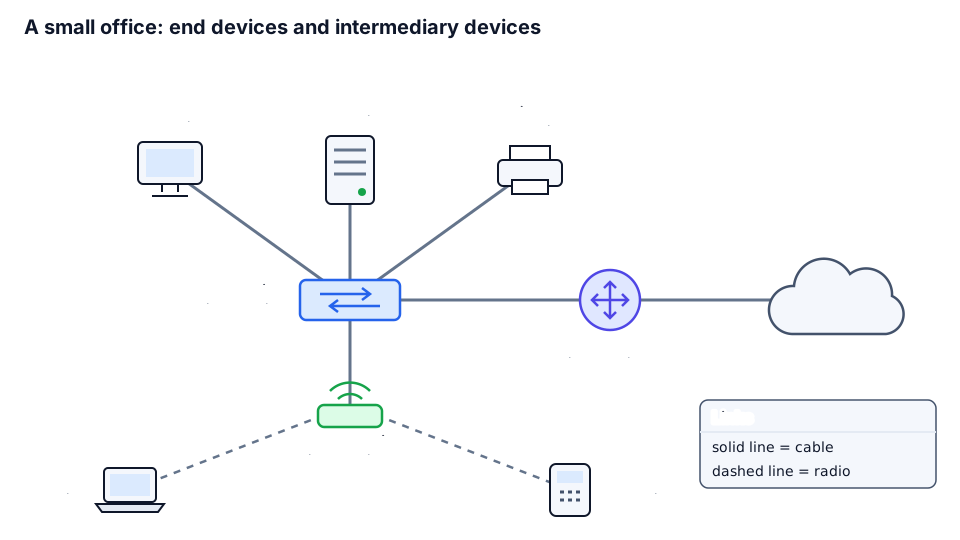
Worked example: reading the office diagram
The diagram above shows a similar small office: a server, a printer, one PC, and also a laptop and a phone. Let us list its nodes and links:
nodes (8): PC, Server, Printer, Laptop, Phone, Switch, Router, Access point

links (8):
  cable  PC - Switch
  cable  Server - Switch
  cable  Printer - Switch
  cable  Switch - Access point
  cable  Switch - Router
  cable  Router - Other networks
  radio  Access point - Laptop
  radio  Access point - Phone
A solid line is a cable, a dashed line is radio. The cloud "Other networks" stands for everything outside the office; what is inside does not matter, so it is drawn as a cloud. The office has eight nodes and eight links: the switch has five links, a PC has one.
End devices and intermediary devices
Every node belongs to one of two classes, depending on what happens to the data in it.
- End device — data begins or ends in it. A person or a program creates the data (writes a letter, films a video) or receives it (reads, watches, prints).
- Intermediary device — it sits on the path of the data, but the data is not meant for it. Its job is to pass the data on.
An analogy is an ordinary letter. The sender and the addressee are end devices. The post offices and sorting centres on the way are intermediary devices: the letter is not addressed to them, they only send it on to the next stop.
| Device | Class | Role in the network |
|---|---|---|
| PC | end | a workplace: a person creates and reads data |
| Laptop | end | the same as a PC, but portable; often connects by radio |
| Phone | end | the same in a pocket: messages, photos, video |
| Printer | end | a print job finishes its journey in it |
| Server | end | a powerful computer that holds shared files and websites |
| Switch | intermediary | connects devices in one place and passes data to the right one |
| Router | intermediary | passes on: joins the network to other networks |
| Access point | intermediary | connects wireless devices to the cabled network by radio |
A check for any device: "does data begin or end here?" Yes — end device, no — intermediary. A printer that never sends anything is still an end device: the printed document goes no further.
➡️ What a server does and how other devices contact it — in lesson 2; why a home box with antennas combines several roles — in lesson 5.
Worked example: the path of a print job
A translator prints a document from the laptop. Let us find the path on the office diagram:
Laptop --radio--> Access point --cable--> Switch --cable--> Printer
end device        intermediary            intermediary      end device

links on the path: 3
intermediary devices on the path: 2
The data began in the laptop and ended in the printer — those are the end devices. The access point and the switch in the middle only passed it on. Remove either of them and the path is broken.
If the laptop needs something from another network, the path is longer: Laptop → Access point → Switch → Router → Other networks — four links and three intermediary devices; the way out goes through the router.
Data and a shared resource
Data is any content that one node sends to another. End devices create and receive it, intermediary devices pass it along.
A shared resource is something that one node owns and many nodes use. An analogy is the shared kitchen in a student flat: one cooker for everybody instead of a cooker in every room. In an office the shared resources are the printer in the corridor (all staff use it), the "Contracts" folder on the server (all PCs and laptops see it) and the way out to other networks through the router.
Shared resources save money and remove confusion. One printer for five people is cheaper than five printers. One file in one folder instead of five copies on flash drives: fix it once and everybody sees the fix.
Why networks are needed: three reasons
| Reason | Example at home | Example in an office |
|---|---|---|
| Exchange of data | send a photo from the phone to the laptop without a flash drive | put a file in a folder on the server so a colleague opens it a minute later |
| Shared resources | one printer for the whole family | one printer and one folder of contracts for the whole bureau |
| Communication between people | a video call to a grandmother in another city | messages and calls between colleagues, a video meeting with a customer |
Scale: from a room to the whole world
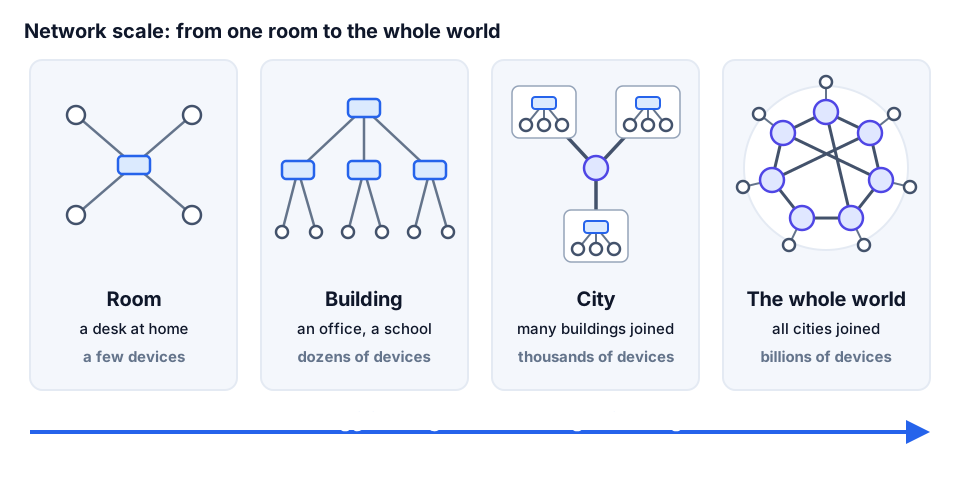
A room has a few devices, a building has dozens, a city has thousands, the whole world has billions: it is the network that all the other networks are connected to. Examples for each step are on the diagram.
A large network is many small ones joined by intermediary devices, so the principles are the same everywhere: nodes, links and data. When you open a website, your data goes through the network of your room, the network of your building and many networks of other people.
➡️ Networks of different scales have their own names and abbreviations (LAN, WAN) — in lessons 4 and 5; the network of the whole world is called the Internet, and how networks are joined into it — in lesson 5.
Everyone to everyone and through a common node
How do you join five devices? There are two extremes.
- Everyone to everyone: every pair of devices has its own link.
- Through a common node: every device has one link to a common node (in an office, a switch), and the node passes data from any device to any other.
An analogy is airlines. You can open a direct flight between every pair of cities, or you can carry passengers through a hub airport: from any city to the hub, and from there to the destination.
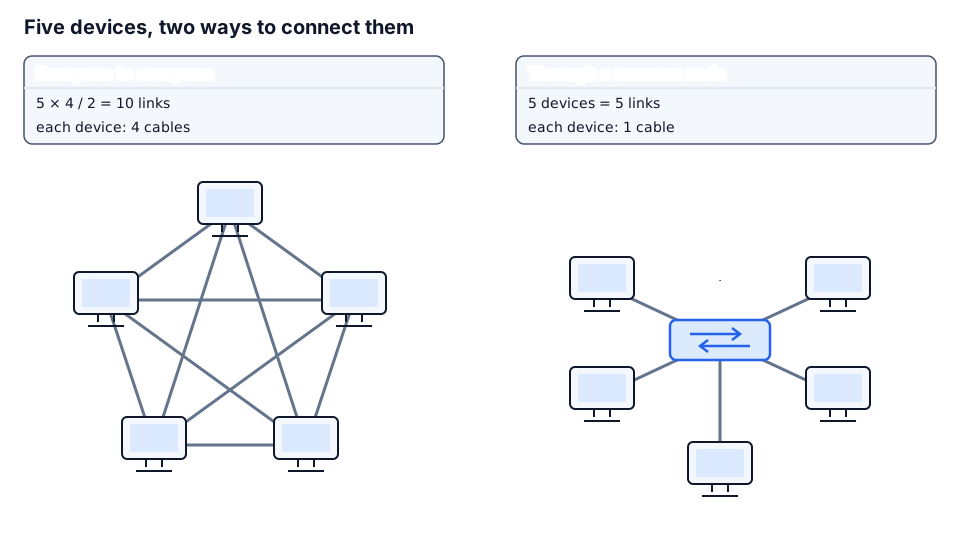
➡️ The "everyone to everyone" scheme is called a full mesh and "through a common node" is called a star; more in lessons 4 and 7.
Worked example: how many links for five devices
Let us name the devices with letters and list every pair:
devices: A B C D E

pairs:  AB AC AD AE
           BC BD BE
              CD CE
                 DE
total: 4 + 3 + 2 + 1 = 10 links

formula: n × (n − 1) / 2 = 5 × 4 / 2 = 10
why:     each device has n − 1 = 4 links; 5 × 4 = 20 link ends;
         one link has two ends, so 20 / 2 = 10

through a common node: n = 5 links
Each of the n devices has n − 1 links to the others. That gives n × (n − 1) link ends in total, and every link has two ends, so there are half as many links. Through a common node every device needs one link — n in total.
| n | Everyone to everyone | Through a common node |
|---|---|---|
| 2 | 1 | 2 |
| 3 | 3 | 3 |
| 4 | 6 | 4 |
| 5 | 10 | 5 |
| 10 | 45 | 10 |
| 50 | 1225 | 50 |
| 100 | 4950 | 100 |
Two devices are better joined directly: one link instead of two. For three the schemes tie, and from four devices on the common node wins, with a gap that keeps growing: when n doubles from 50 to 100, "everyone to everyone" needs four times as many links (1225 → 4950), while the common node needs twice as many.
➡️ The socket for a cable on a device is called a port — in lesson 3.
Worked example: the translation bureau
Back to the task. There are n = 5 devices. "Everyone to everyone" means 10 cables and 4 sockets on every device, while a printer and a PC usually have one: that scheme cannot be built. Through a switch it is 5 cables, one per device, plus the switch itself with five sockets. Every translator prints from their own desk, there is one "Contracts" folder, and no flash drives are needed.
The common node has a price: while the switch works everything is fine, but if it breaks, everyone loses contact. In the "everyone to everyone" scheme the failure of one link breaks only that pair.
➡️ A device or a link whose failure stops the whole network is called a single point of failure; how to deal with it — in lesson 7.
What can go wrong and how to find it
When communication is lost, do not restart everything in turn. Ask: who exactly is affected, and what do those devices have in common?
| Symptom | Possible cause | What to check |
|---|---|---|
| One PC sees neither the server nor the printer, the rest work | its link, or the PC itself | the cable at both ends, whether the PC is on |
| The laptop and the phone lost contact, but the cabled PCs work | the access point is off, or the device is too far from it | the access point's power, its cable to the switch |
| All devices in the office stopped seeing each other | the common node (the switch) is off or broken | the switch's power; how many devices are affected |
| Everything works inside the office, but you cannot reach other networks | the router, or its link going out | the router's power, the cable going out |
The rule: one affected device — look at its link or at the device itself; several — look for the common device on their path; all of them — check the common node.
⚠️ A typical beginner mistake is to replace or restart the device where the problem was noticed. First find out how many devices are affected: a problem at the end of a chain and a problem in the common node are fixed in different ways.
Practice
- Predict. Six devices. Without calculating, write down how many links "everyone to everyone" needs and how many "through a common node" needs.
- Check. Calculate with the formula
n × (n − 1) / 2and compare with the list of all pairsAB,ACand so on. Did the result match your guess? - Explain. On the office diagram trace the path of data from the phone to the server. Name the end and intermediary devices and the number of links.
- Change. The bureau has grown from five to eight devices. How many links does each scheme need now, and how many more than before?
- Do it yourself ⭐. A computer room has 15 PCs, a printer and a server. How many links does each scheme need and how many sockets does the common node need? What happens if one PC's cable is pulled out, and what if the common node fails?
Self-check
Question 1. On the office diagram data goes from the phone to the printer. Which devices does it pass through and which of them are end devices?
Analysis. The path is Phone → Access point → Switch → Printer. The end devices are the phone and the printer: data begins in the first and ends in the second. The intermediary devices are the access point and the switch: the data is not meant for them, they only pass it on. There are three links: one radio link and two cables.
Question 2. A class has nine devices. How many links do the "everyone to everyone" and "through a common node" schemes need?
Analysis.
everyone to everyone: 9 × 8 / 2 = 36 links
through a common node: 9 links
That is four times fewer links, and one socket per device instead of eight. The gap grows with n.
Answers to the practice. 1 — 15 and 6. 2 — 6 × 5 / 2 = 15, and the pairs add up the same way: 5 + 4 + 3 + 2 + 1 = 15; through a common node — 6. 3 — Phone → Access point → Switch → Server: the end devices are the phone and the server, the intermediary devices are the access point and the switch, three links (radio and two cables). 4 — 8 × 7 / 2 = 28 against 8; before it was 10 and 5, so 18 and 3 more links. 5 — there are 17 devices: 17 × 16 / 2 = 136 against 17; the common node needs 17 sockets; with the cable pulled out only that PC loses contact, if the common node fails all 17 do.
Review and the criterion for moving on
Move on to the next lesson if you can, without hints:
- name the three parts of a network and give an example of each;
- sort eight devices into end and intermediary and name the role of the switch, the router and the access point ("connects" or "passes on");
- count the links in both schemes for any
nand explain why a common node is better for a largen; - give three reasons why networks are needed and an example of a shared resource.
Review question. There are no earlier lessons yet, so go back to the start of this one: every link has two ends. How does that fact give the division by 2 in the formula n × (n − 1) / 2? Answer: n devices with n − 1 links each make n × (n − 1) link ends, and every link has two of them, so there are half as many links.
Standards and sources
- Cisco, CCNA 200-301 Exam Topics v1.1, item 1.1 "Explain the role and function of network components" — the roles of endpoints, servers, switches, routers and access points.
- The number of links "everyone to everyone",
n × (n − 1) / 2, is the number of combinations ofnthings taken 2 at a time, and also the number of edges of a complete graph withnvertices. - ITU, Facts and Figures 2025 — estimates of the number of people using the Internet (about 5.8 billion in 2024).
